Dashboards are where most questions about a model get answered. The loss curve, the eval score, the comparison across a sweep: a good Workspace shows you these at a glance. The questions that decide whether a model ships are usually one step past that. Why did this slice regress? Which examples fail, and what do they have in common? Is the pattern causal or an artifact of how the data was collected? Answering them means writing code to slice and visualize the data you're already looking at.
Today we're announcing CoreWeave Notebooks, now available in CoreWeave Forge. A notebook opens from your project, already connected to your experiments, artifacts, and evaluation results, and gives you Python and SQL to shape that data into the analysis the question requires. Notebooks run on marimo, the open source reactive Python notebook, so every output reflects the current code without stale cells. And they're saved to the project and listed alongside your teammates' notebooks, so anyone on the team can copy one, see the analysis with the data attached, and build on it.
Finding what was averaged away
Here's a quick example from our demo notebook. A driving model is trained to stop at red lights, and its aggregate traffic-light loss looks fine. But the training data has attributes the dashboard doesn't chart by default: weather conditions, time of day, whether there's another red object in the frame near the light.
Here's what we uncovered in a notebook.
The model’s loss is low in most weather conditions. It is much higher in heavy rain at night when a red object is near a traffic light. Sorting the frames by loss and displaying the worst ones reveals a pattern.
These frames all show a traffic light in the rain at night, with a red building or truck nearby. The model distinguishes the traffic light from these objects in daylight, but confuses them in these conditions.
Overall metrics can hide failures like this. To find them, you need to filter the data by specific attributes, plot comparisons that an existing dashboard may not support, and inspect the worst cases. A notebook connected to your data lets you do all three.
Starts connected to your project
Open a notebook from any project in Forge and it's already authenticated and pointed at that project's data. Query training metrics across your experiments, load an evaluation table from an artifact, filter it to the examples you care about, and start analyzing in the first cell. Standard panels answer the common questions you can anticipate in advance. When the dashboard doesn't cover what you're after, Notebooks let you write a few lines of Python to slice the data your own way and visualize it however you need in the moment.
Reactive, so what you see is what your code produced
CoreWeave Notebooks use marimo, an open source reactive Python notebook. marimo builds a dependency graph from variable references. When a variable changes, dependent cells run automatically, or can be marked stale for expensive computations. Delete a cell and its variables are removed from program memory. This keeps code, program state, and visible outputs aligned.
That behavior matters in debugging. An investigation changes one assumption at a time: the run set, a threshold, a data slice, a time window. Reactive execution updates every dependent view, so an old output never survives beneath new code and sends the investigation in the wrong direction.
It also makes exploration interactive. Add a slider, a dropdown, or a table filter and the notebook responds as you move it. In the driving example, a weather selector re-renders the loss chart and the worst-frames grid together, so testing a hypothesis is a matter of moving a control rather than editing and rerunning cells.
Built to be shared
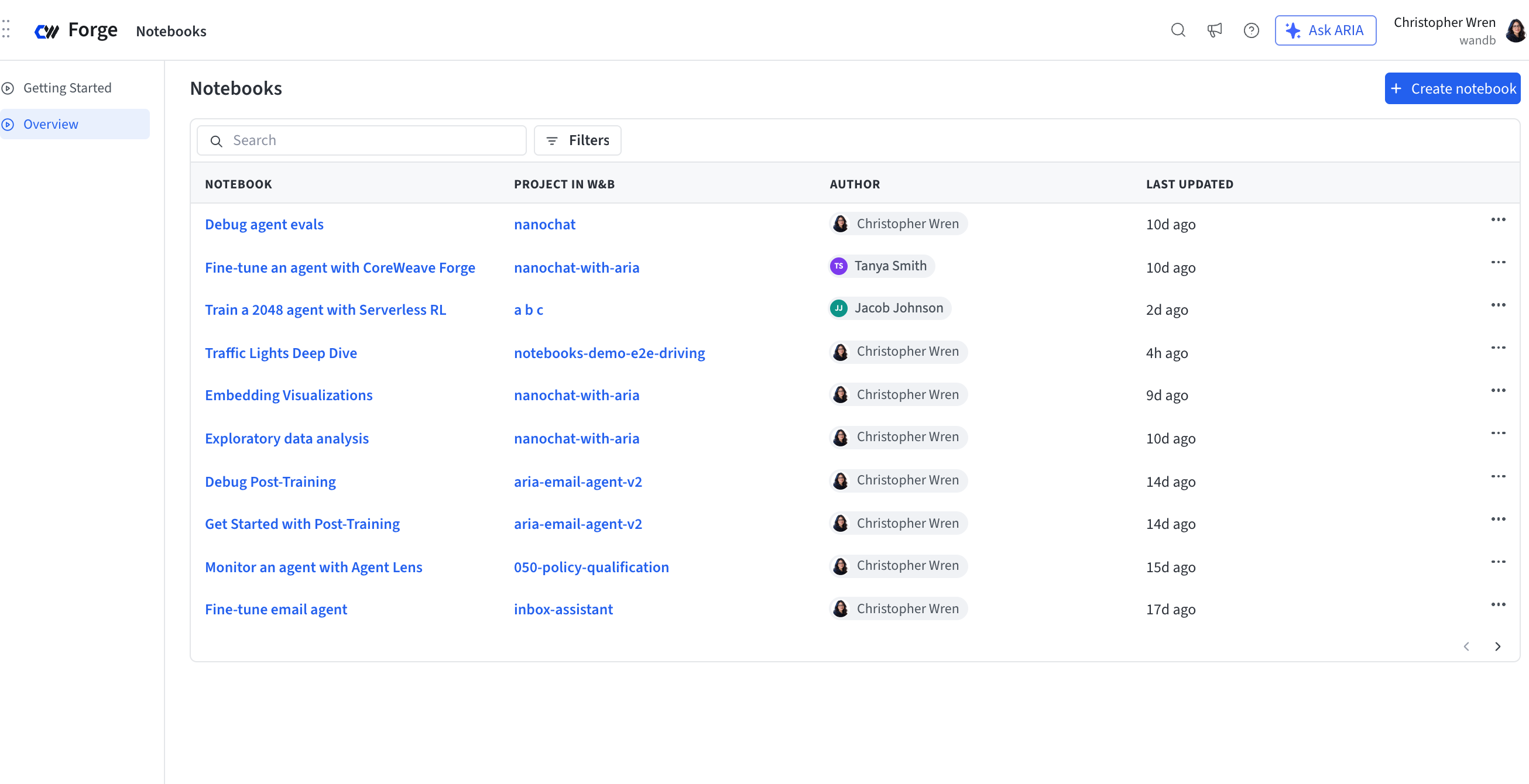
Notebooks are stored in the project, not in someone's local files. Every project has a listing page where all of the team's notebooks appear together, so anyone can open a colleague's notebook with the data attached, read the investigation, and copy it as a starting point for their own. Forge also lists notebooks across your projects in one view, so prior analysis is discoverable rather than buried on a laptop.
When the next round of experiments comes in, you open the same notebook and rerun it on the new data. A one-time investigation becomes the team's regression check.
Part of the AI Loop
CoreWeave Notebooks are part of CoreWeave Forge, where the questions change as you move through the loop. Before training, it's running exploratory data analysis on your dataset to check for gaps and duplicates. Mid-training, it's diagnosing an experiment that diverged from its baseline. At evaluation, it's finding the failure mode the aggregate score averages away. Notebooks give you one place to answer each of these, with Python, next to the data in your Forge project.
What's next
Notebooks at public preview are built for interactive analysis next to your data. Over the coming months we're extending them in a few directions.
The first is publishing a view from a notebook back to your Workspace as a persistent panel, so your custom analysis shows up alongside your other panels and refreshes with the latest data. The second is hosting a notebook as a data app, an interactive dashboard anyone on the team can use without opening the code, whether that's a labeling tool or a sliceable view of the team's results. We're also bringing more compute to the notebook sandbox, so data science teams can train the forecasting and classification models they build every day directly in a notebook. Finally, CoreWeave ARIA will soon have the ability to co-author notebooks with you. Describe the view you need and ARIA writes the cells, so you don't have to be fluent in pandas and plotting libraries to get the chart you're after.
Get started
Open Notebooks from any project in Forge, or start from the getting started page. CoreWeave Notebooks are powered by marimo; to learn more about reactive execution, see the marimo documentation.