Data processing is now a GPU workload
Large language models (LLMs) have moved well past chat. Physical AI, drug discovery, recommendations, and creative generation all need the same thing first: internet-scale multimodal data that has been found, filtered, and turned into something a model can train on.
That work no longer fits on just CPUs. Video, audio, LiDAR, and satellite data have to be decoded, filtered, featurized, and normalized, and at exabyte scale that means GPUs. Standing up the infrastructure to do it usually costs a team weeks or months before they see a single result.
Anyscale and CoreWeave built a video captioning pipeline across millions of clips to find out how fast that path could actually be. From account signup to a running production job: under 24 hours. Here’s how it went, and what the numbers looked like at 1,600 GPUs.
Two infrastructure layers for video captioning
Two layers made this run, and each one made the other quicker. They’re worth separating before the timeline.
What Ray handles
Ray OSS and Anyscale own the workload layer. Ray schedules tasks and actors across the cluster, streams data through the pipeline, and scales the number of workers to match demand. What Ray can’t see is the hardware. It doesn’t know that a node is thermally throttling, or that one straggler GPU is quietly holding up a stage.
What CoreWeave handles underneath
The CoreWeave layer handles the AI infrastructure. CoreWeave Kubernetes Service runs Kubernetes directly on bare metal nodes, with GPU drivers, network and storage interfaces, and observability plug-ins already installed, which is why the Anyscale install took an hour instead of an entire quarter. CoreWeave Mission Control runs continuously across the fleet, evaluating node and cluster health, catching stragglers before they stall a job, and replacing unhealthy nodes automatically.
Storage sits at the same layer. CoreWeave AI Object Storage (CAIOS) holds the dataset as a single global namespace with no egress, request, or transaction fees, and the CAIOS Local Object Transport Accelerator (LOTA) runs on every CoreWeave node to bypass the standard gateway and cache fetched objects on local NVMe. That keeps repeated reads, model weights especially, off the network and close to the GPU.
Ray Data decides what runs where and keeps the pipeline streaming. CoreWeave keeps the AI infrastructure healthy, the storage fast enough to feed it, and the cluster whole when a node drops. GPUs are easy to allocate and hard to keep busy, and the gap between those two states is infrastructure the workload layer never has to compensate for.
From account signup to production job in under 24 hours
Standing up GPU infrastructure at this scale is normally measured in weeks: procurement, Kubernetes install, driver and network validation, storage plumbing, and finally a scheduler that can keep the GPUs fed. This took less than a day.
- Hour 0. CoreWeave provisioned the reservation: a dynamic cluster scaling to 1,600 NVIDIA RTX PRO 6000 Blackwell Server Edition GPUs, 200 AMD Turin 9655P nodes at 192 vCPUs each, and CoreWeave AI Object Storage as the data lake.
- Hour 1. Anyscale went onto CKS as an operator install because CKS already handles the managed control plane, GPU drivers, networking, and node lifecycle.
- Hour 2. Orchestration test: CKS ran the node layer while the Anyscale operator ran Ray cluster lifecycle, GPU autoscaling, workload placement, and the developer interfaces into the reservation.
- Hour 10. We authored the pipeline in Ray Data as a single streaming job, with CPU decode and filter feeding GPU captioning. We developed it interactively against the live cluster in Anyscale Workspaces.
- Hour 15. We tuned it for GPU utilization and throughput using Anyscale Observability, CoreWeave AI Object Storage bandwidth, and faster model loads.
- Hour 20. We promoted the same code to a fault-tolerant Anyscale Job, no rewrite, with retries and autoscaling for the full-scale run.
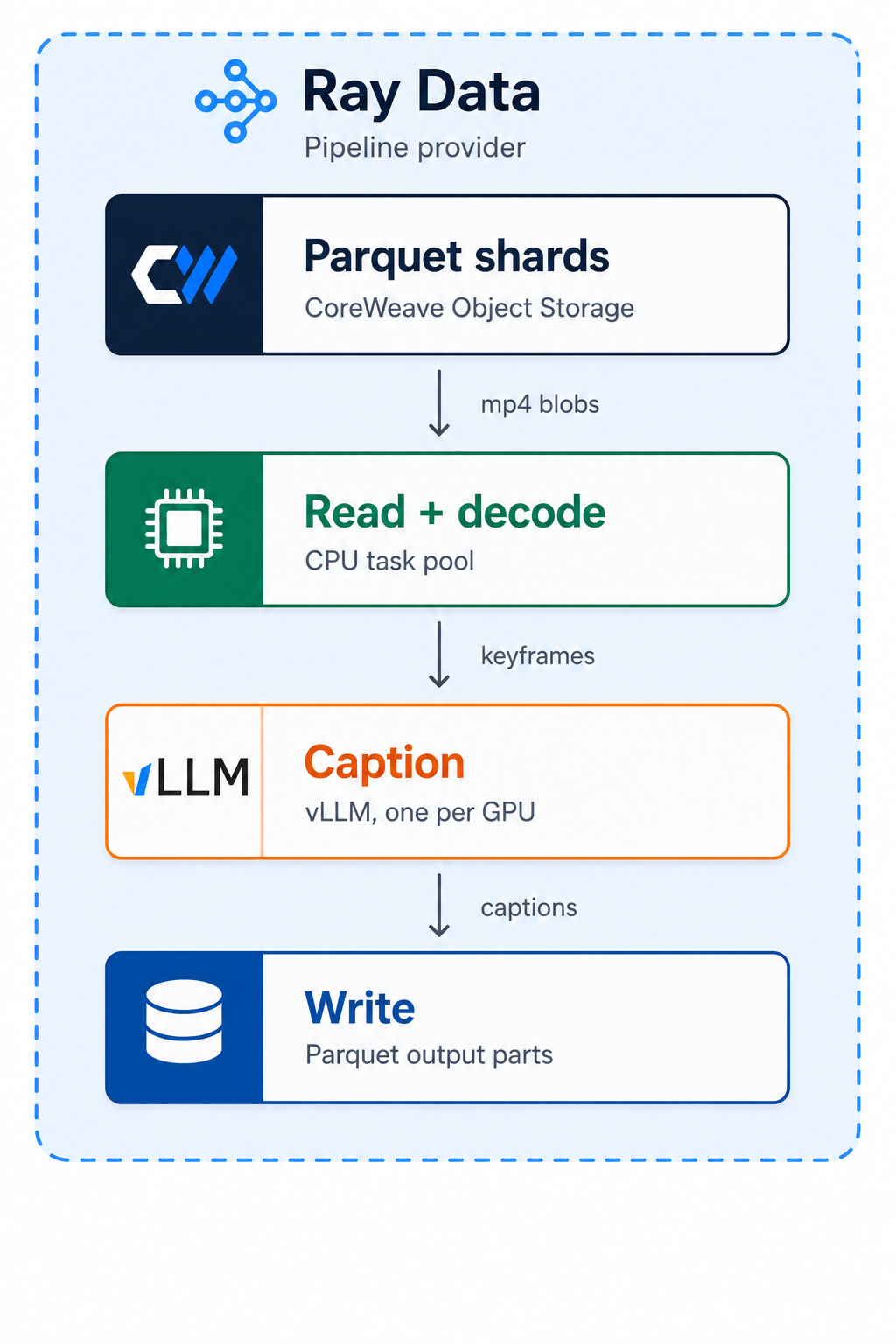
The pipeline itself had two stages.
- CPU stage: video decode, scene-boundary splitting, and filtering.
- GPU stage: caption and annotation inference with Qwen3-VL-8B over the resulting clips.
From Ray Core to Ray Data
Our validation started small. Before we pointed anything at the full 1,600 GPU reservation, we ran the pipeline against a 600 GB dataset on a fixed pool of 256 GPUs, and that’s where the first bottleneck surfaced.
The first pass at video captioning used Ray Core. Remote functions read the video dataset and decoded keyframes on the CPU:
@ray.remote(num_cpus=1)
def read_and_decode_shard(path: str) -> List[Dict[str, Any]]:
    # Decoding logic here
Inference ran on Ray actors. An actor is a Python class that Ray pins to a long-lived worker process, so the expensive state gets initialized once and reused across calls instead of rebuilt on every request. Here each actor held one GPU and one loaded vLLM engine.
We created and managed those actors by hand. Our driver maintained a fixed list for round-robin scheduling, so this implementation did not automatically flex with demand:
@ray.remote(num_gpus=1)
class CaptionActor:
    # vLLM inference logic here

# Manual actor management
actors = [CaptionActor.remote() for _ in range(num_gpus)]
Ray Data took that management away. It streams execution and scales resources to workload demand. Reading directly from a Parquet manifest decoupled ingestion from video decoding and enabled better pipelining:
# Direct, optimized data ingestion
ds = ray.data.read_parquet(input_path, **read_kwargs)

# Applying decode logic via a simple map operation
ds = ds.flat_map(decode_row, num_cpus=1)
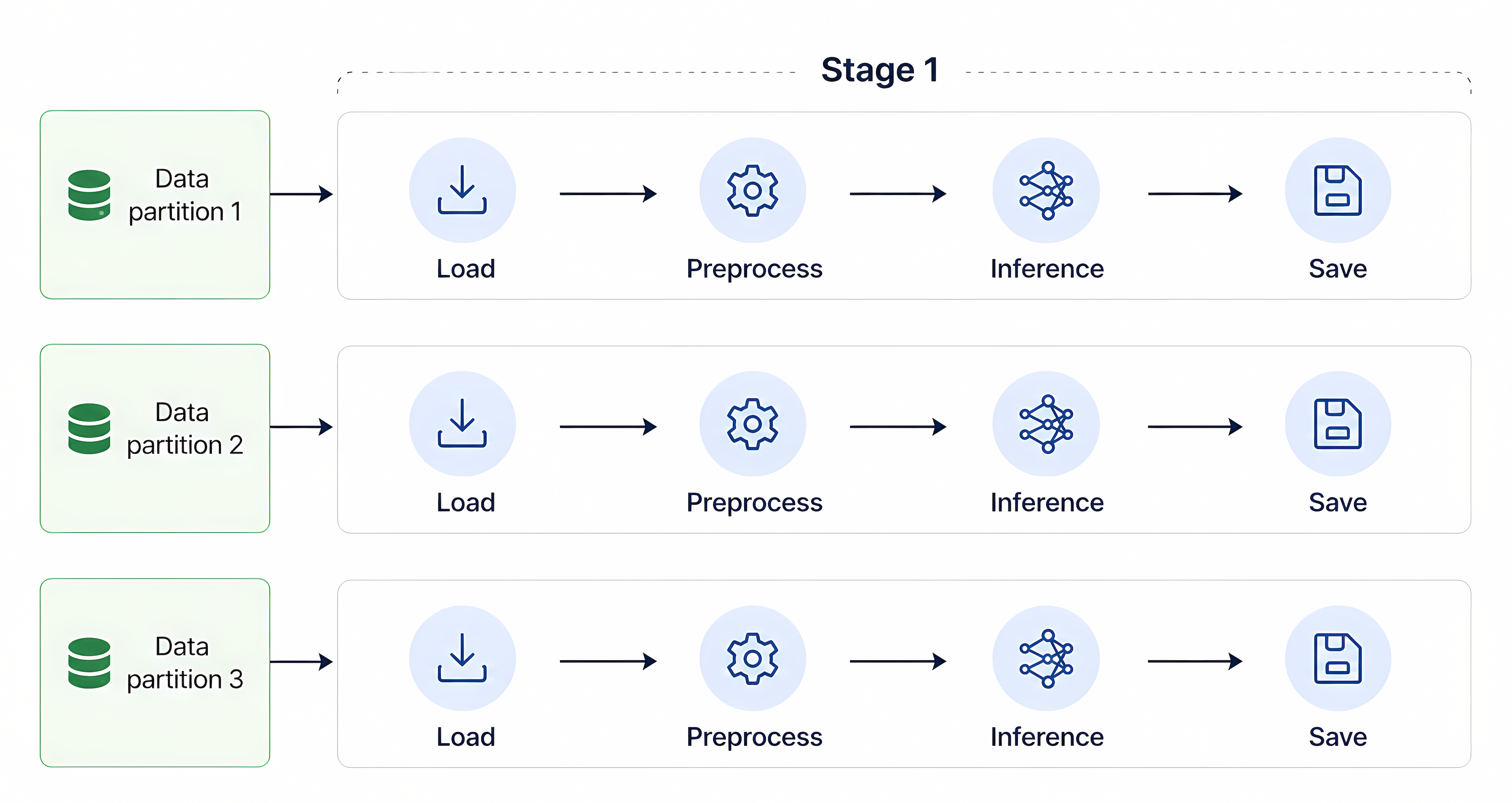
Batched model inference came built-in. Instead of standing up and orchestrating vLLM engines through Ray actors, we passed the config to a batch processor and the pipeline collapsed to read_parquet, flat_map, processor, write_parquet:
vlm_processor = build_processor(
    vLLMEngineProcessorConfig(**config_kwargs),
    preprocess=vlm_preprocess,
    postprocess=vlm_postprocess,
)
ds = vlm_processor(ds)
Scale the dataset 1,000x and CoreWeave AI Object Storage keeps pace
The question most teams actually have isn’t whether a pipeline runs. It’s what happens to cost per unit of work when the dataset grows by a factor of a thousand. So we found out.
We grew a 600 GB dataset to 600 TB with a Ray Data pipeline that generated 1,000 synthetic variations of each video using FFmpeg. Stage one remuxed with a keyframe crop and playback retime. Stage two re-encoded with spatial crop, flip, color jitter, noise, speed, and libx264.
Anyscale’s Developer Central and Ray Workloads Dashboards show what that scaling event did to infrastructure utilization, throughput, and workload placement. At peak, 35,820 CPU cores turned 43,700 original clips into 70 million.
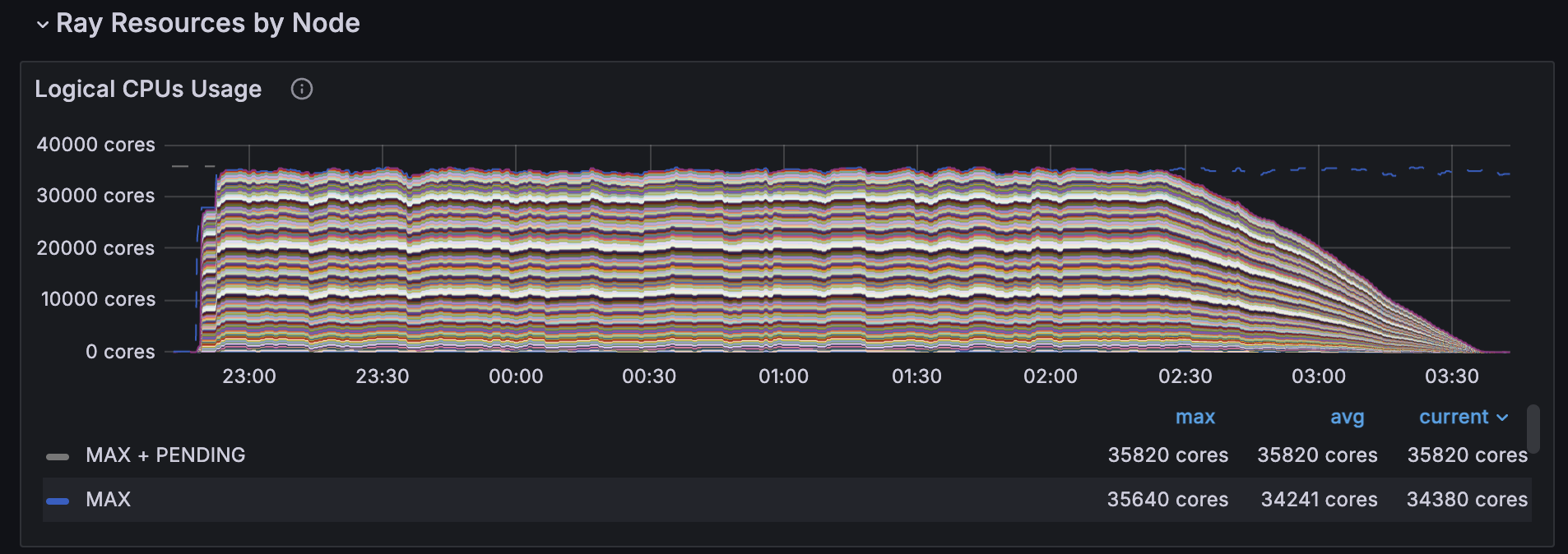
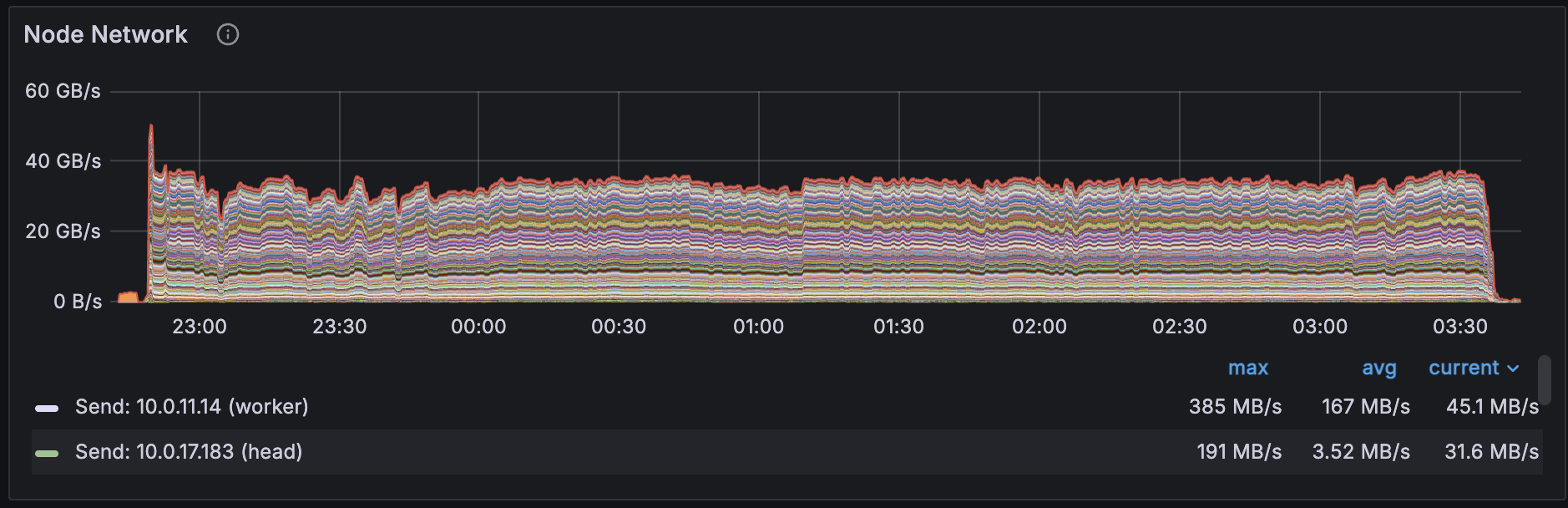
CoreWeave AI Object Storage absorbed the writes at 40 GB/s, saturating network bandwidth, with PUT latency holding at a p50 of 9.1s and a p99 of 18.8s.
1,600 GPUs in action
Running video captioning on the full 600 TB, throughput held. Even without caching, CoreWeave AI Object Storage served 110 to 120 GB/s across roughly 46 CPU nodes, about 2.4 GB/s per node, handling around 8,500 single-stream GETs fleet-wide. Captioning finished in 95 minutes.
Video captioning benchmark results
Ray Core vs. Ray Data (600 GB dataset)
Processing 43,700 clips into 1 million captions, Ray Data used 73% of the GPU time Ray Core needed and produced 3.7x more captions per GPU-hour. Autoscaling and compute pipelining account for the gap. Streaming keeps GPUs fed; a fixed actor pool doesn’t.
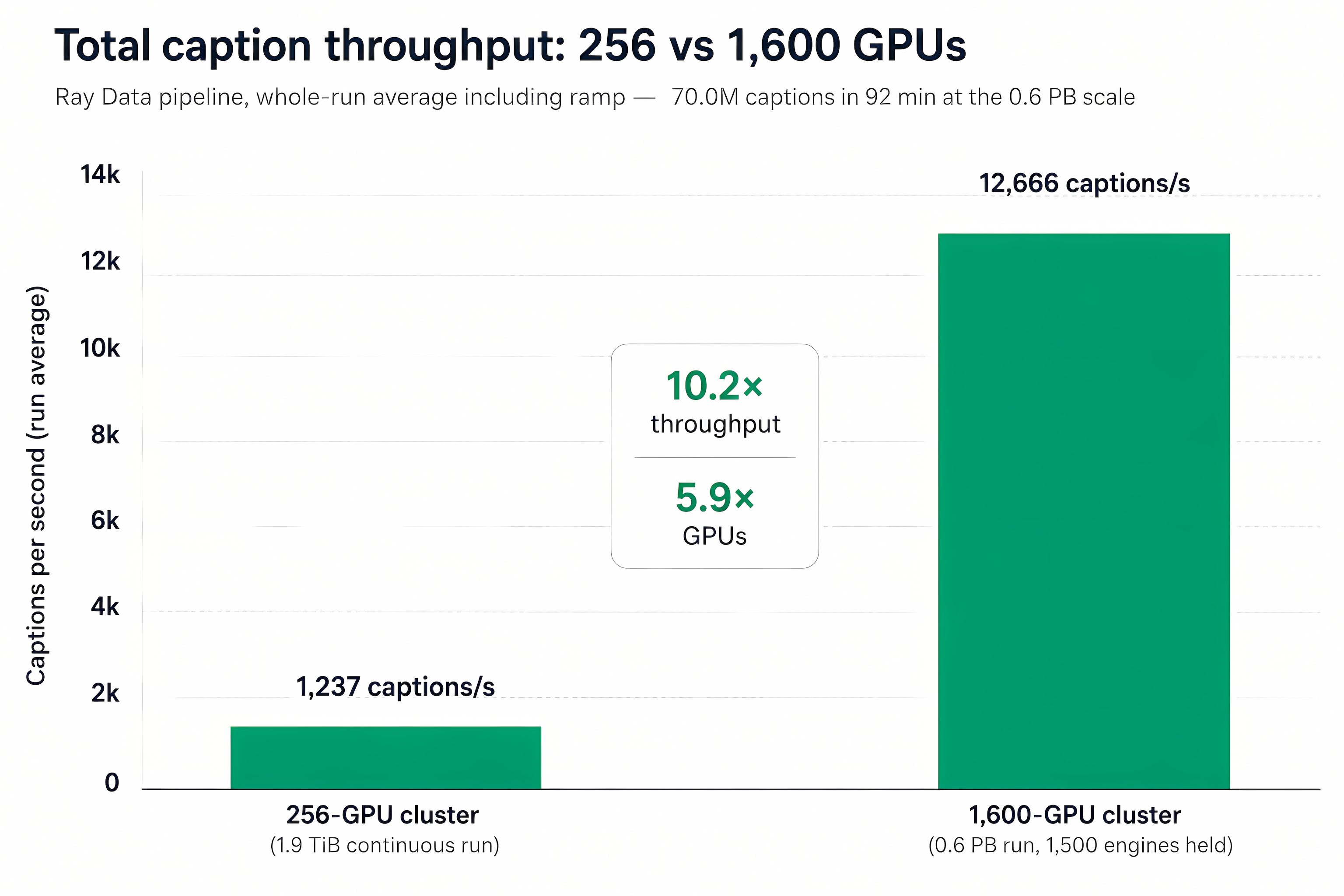
600 GB vs. 600 TB
Scaling the GPU cluster roughly 6x, from 256 to 1,600 GPUs, held caption-per-GPU-hour efficiency steady. Total throughput grew 10.2x, from 1,273 to 12,666 captions per second. Throughput outran the cluster because the larger CPU pool kept the decode stage ahead of the GPUs instead of starving them.
Feeding 1,600 GPUs without a storage bottleneck
A streaming pipeline is only as fast as the storage under it. Loading Qwen3-VL onto every GPU at once moves about 4.3 TB of tensor data, with up to 255 peers requesting the same bytes at the same moment. That thundering-herd pattern flattens conventional object storage.
This is where the LOTA cache component of CoreWeave AI Object Storage earns its place. Because it caches on CPU and GPU node-local NVMe, the second engine to ask for a given tensor doesn’t touch the backend at all.
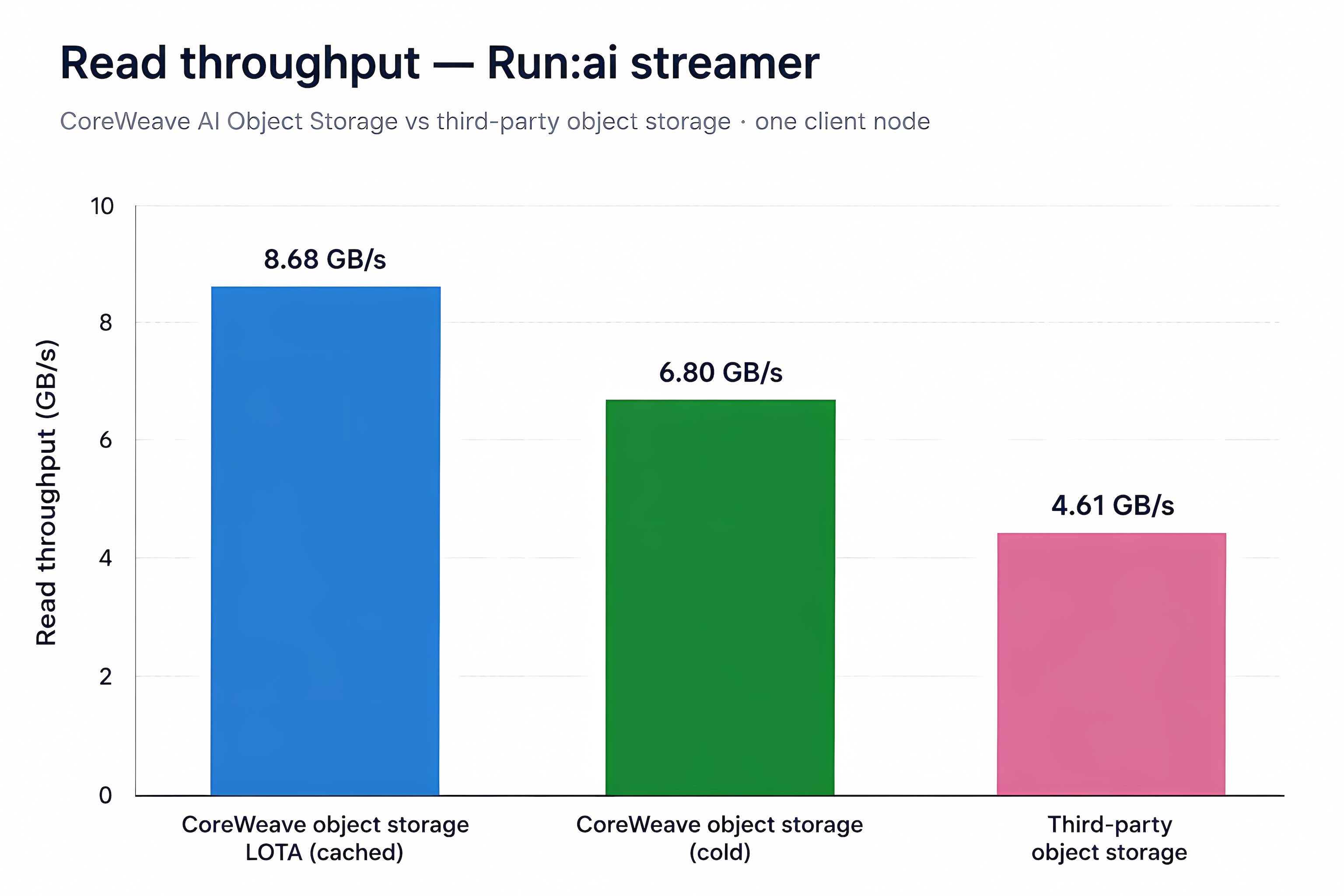
Model loading (17 GB Qwen3-VL)
- Each engine read at 8.68 GB/s with LOTA serving the model from local cache
- The full 17 GB model landed in about two seconds
- That’s 1.88x faster than third-party object storage and 1.28x faster than a cold read from CoreWeave AI Object Storage
LOTA is why a 17 GB model lands in two seconds.
Dataset reads
For raw ingestion, 1,357 parallel tasks read 677 GB of MP4 files. With roughly 960 concurrent single-CPU readers, the stream from CoreWeave AI Object Storage held about 4.5 GB/s and finished in 140 seconds.
What it takes to make large-scale video captioning work
Data processing at this scale is an orchestration problem across the whole stack, and every layer has to hold at once: managed Kubernetes that doesn’t cost a quarter to stand up, a scheduler that keeps 1,600 GPUs saturated, and storage that never becomes the bottleneck.
600 TB of video and 70 million captions in 95 minutes, on a pipeline that went from sign on to production in under 24 hours. If your data curation backlog is measured in months, the constraint probably isn’t your models.
If your pipeline is storage-bound, start with the CoreWeave AI Object Storage docs.