


CoreWeave Sandboxes: isolated execution for AI at scale
Agentic AI doesn't just produce outputs—it executes code. CoreWeave Sandboxes contains that execution at scale, without adding a separate stack to your infrastructure. See how.
1
00:00:05,833 --> 00:00:07,600
Hi my name is Deok
2
00:00:07,600 --> 00:00:08,533
I'm a product manager
3
00:00:08,533 --> 00:00:09,466
here at CoreWeave
4
00:00:09,900 --> 00:00:11,700
if you've been training agents
5
00:00:11,800 --> 00:00:15,433
running RL loops or model EVALs
6
00:00:15,433 --> 00:00:16,900
you've run into this challenge probably
7
00:00:16,900 --> 00:00:19,233
Code that came from the model
8
00:00:19,233 --> 00:00:22,066
has to run somewhere for you to verify it works well
9
00:00:22,566 --> 00:00:24,900
and you really don't want it touching your laptop
10
00:00:24,900 --> 00:00:27,800
or your training cluster that's what a sandbox is for
11
00:00:27,800 --> 00:00:30,533
an isolated environment spun up quickly
12
00:00:30,600 --> 00:00:34,166
that runs untrusted code human or model generated
13
00:00:34,566 --> 00:00:36,966
We're introducing CoreWeave Sandboxes
14
00:00:37,233 --> 00:00:39,366
there's basically two ways to use it
15
00:00:39,766 --> 00:00:43,700
You can use CoreWeave Managed Compute
16
00:00:43,700 --> 00:00:45,400
on a serverless option
17
00:00:45,466 --> 00:00:47,066
where you install the Weights and Biases
18
00:00:47,066 --> 00:00:50,100
SDK you log in and you can start running sandboxes
19
00:00:50,366 --> 00:00:52,866
there's no infra to set up and nothing to deploy
20
00:00:53,600 --> 00:00:56,400
There's also sandboxes for CKS and SUNK
21
00:00:56,866 --> 00:01:00,366
This infrastructure option is multi cluster by design
22
00:01:00,466 --> 00:01:03,300
it runs sandboxes on the clusters you already have
23
00:01:03,300 --> 00:01:05,266
on compute you're already paying for
24
00:01:05,566 --> 00:01:07,466
including idle CPU
25
00:01:07,466 --> 00:01:10,566
on the GPU nodes where you may be running SUNK
26
00:01:10,566 --> 00:01:13,333
which comes in very handy with capacity limitations
27
00:01:14,600 --> 00:01:18,266
Set up is easy for sandboxes through a simple CLI
28
00:01:18,300 --> 00:01:20,000
here you only need sandboxes
29
00:01:20,000 --> 00:01:21,700
admin IAM permissions
30
00:01:22,000 --> 00:01:24,700
and you create a profile that defines guardrails
31
00:01:24,700 --> 00:01:26,566
like networking policies for example
32
00:01:26,566 --> 00:01:29,900
to restrict ingress or internet egress
33
00:01:30,466 --> 00:01:32,833
you can also control namespace strategies
34
00:01:32,833 --> 00:01:34,166
and resource limits
35
00:01:34,866 --> 00:01:37,366
then you enable a runner on your cluster
36
00:01:37,566 --> 00:01:40,033
the runner is a CoreWeave managed workload
37
00:01:40,033 --> 00:01:43,266
which schedules each sandbox as a Kubernetes pod
38
00:01:43,366 --> 00:01:44,066
in your cluster
39
00:01:44,100 --> 00:01:45,700
Researchers in your org
40
00:01:45,766 --> 00:01:49,000
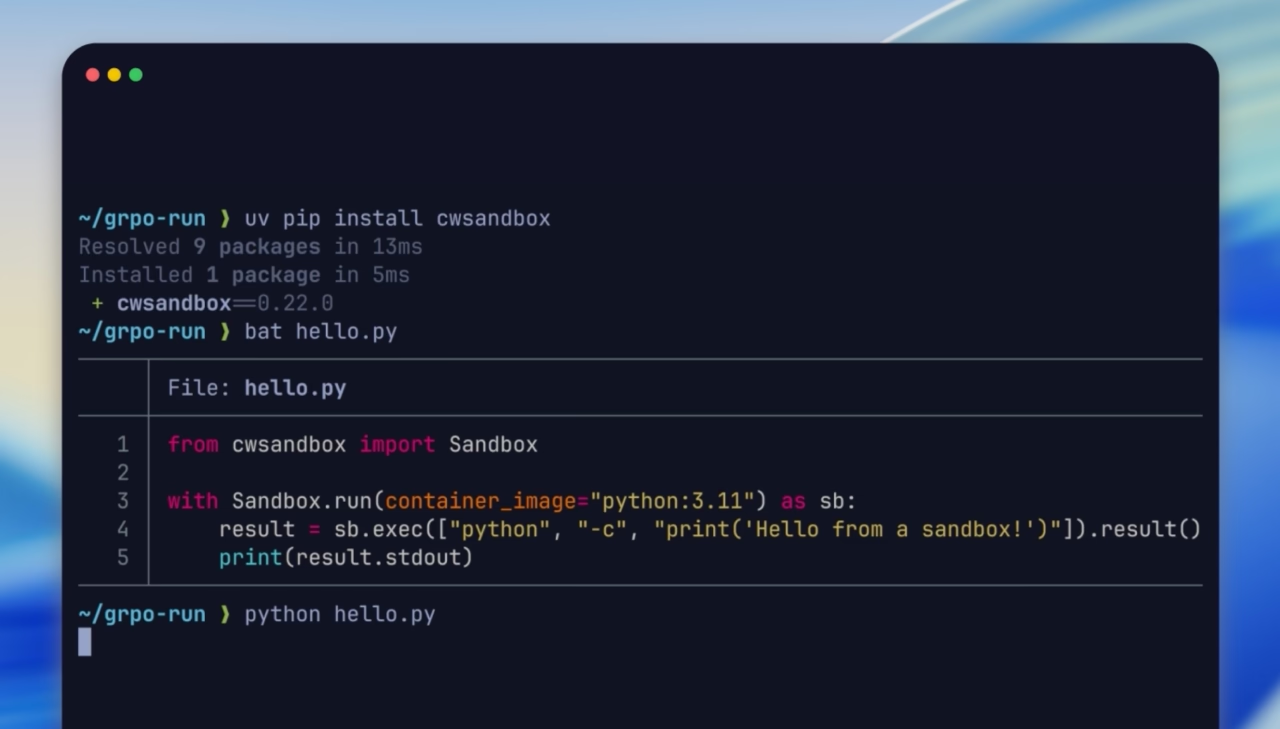
for example just do a pip install CW sandbox
41
00:01:49,033 --> 00:01:51,200
and they can immediately start running commands
42
00:01:51,200 --> 00:01:53,333
and code in sandboxes
43
00:01:53,366 --> 00:01:55,300
from their training scripts
44
00:01:55,300 --> 00:01:57,666
or whatever else they want to run it from
45
00:01:58,400 --> 00:01:59,466
from the SDK
46
00:01:59,500 --> 00:02:02,466
you can spin up thousands of sandboxes in parallel
47
00:02:02,466 --> 00:02:04,000
with a framework like veRL
48
00:02:04,000 --> 00:02:07,500
for example each rollout gets its own sandbox
49
00:02:07,500 --> 00:02:09,433
if you're running evals like SWE-bench
50
00:02:09,433 --> 00:02:11,566
which is a popular coding model benchmark
51
00:02:11,633 --> 00:02:14,966
you can spin up the hundreds of required containers
52
00:02:15,000 --> 00:02:18,100
and sandboxes to evaluate your model quickly
53
00:02:18,500 --> 00:02:20,233
So pick the path that
54
00:02:20,333 --> 00:02:21,866
best fits your needs
55
00:02:21,966 --> 00:02:23,233
and we can't wait to see
56
00:02:23,266 --> 00:02:24,533
what you build next


